What do reviewers agree on?
The first reviews of Apple's touchscreen MacBook Pro landed on November 5, 2026, one day before the laptop reaches customers. The publication-day verdict is unusually consistent. Reviewers describe the MacBook Pro with PROLED XDR Display as the best laptop Apple has built in years, and almost none of that praise is about touch.
The scores reflect that view. The Verge gave it 9 out of 10, Engadget gave it 8.8 out of 10, and Gizmodo awarded 4.5 out of 5. Six Colors did not publish a score but called the machine a big revision of a major product line. All four outlets tested the same core hardware: a 14-inch or 16-inch body, a tandem OLED panel, and the M5 Pro or M5 Max chip that Apple already shipped earlier in 2026.
The agreement centers on two changes. The first is the display, Apple's first OLED screen in a Mac laptop. The second is weight. Apple cut half a pound from the 14-inch model, bringing it to 3.0 pounds, and 0.7 pounds from the 16-inch, bringing it to 4.0. Reviewers treated both as more consequential than the new finger input.
The touchscreen itself drew a mixed but polite reception. David Pierce of The Verge wrote, "I keep forgetting the MacBook Pro with PROLED XDR Display has a touchscreen." Jason Snell of Six Colors called touch "a niche interface so long as you're touching a screen that's upright, hinged behind a keyboard." Neither writer called the feature useless. Both treated it as a secondary input rather than the reason to buy.
That gap between marketing and reviews is the useful takeaway for buyers. Apple leads with a first, while reviewers lead with the changes people feel every day.
How much does the MacBook Pro with PROLED XDR Display cost?
Apple lists the 14-inch MacBook Pro with PROLED XDR Display and an M5 Pro chip at $2,899 in the United States. The 16-inch version starts at $3,399. Education pricing brings those to $2,749 and $3,199. Moving to the M5 Max raises the starting prices to $4,499 and $4,799, or $4,199 and $4,499 with education savings.
The premium depends on what you compare. The non-touch 14-inch MacBook Pro with an M6 chip starts at $1,999, so the cheapest PROLED model costs $900 more. The standard 16-inch model starts at $2,999, which makes the PROLED version $400 more. Reviewers who compared similarly equipped machines landed between those figures. The Verge described a premium of about $400 over a standard Pro with similar specs, while Gizmodo put it at $500.
Configured machines climb quickly. The Verge tested a 14-inch M5 Pro with 18 CPU cores, 20 GPU cores, 48GB of memory and 1TB of storage for $3,699. Gizmodo's 14-inch unit with 64GB of memory totaled $4,099, and its 16-inch M5 Max with 128GB reached $7,399. A fully loaded model with 128GB and 16TB of storage costs $14,549, according to The Verge.
Those numbers sit inside a broader price climb. Engadget noted the 14-inch MacBook Pro started at $1,699 earlier in 2026, rose to $1,999 after June increases, and now reaches $2,899 in OLED form. The 16-inch standard model moved from $2,699 to $2,999. Gizmodo tied the increases to memory prices, which have also hit Windows laptops and other Macs.
Apple also offers a lease through Apple Upgrade at $55.99 per month for 36 months, excluding taxes and trade-in credit. For buyers weighing a $1,999 M6 against a $2,899 PROLED model, the question is whether the screen and lighter body justify $900 over several years.
Is the PROLED XDR display worth the upgrade?
Apple says the PROLED XDR panel reaches up to 2,000 nits of peak brightness in both HDR and SDR content. It claims a 10,000,000:1 contrast ratio, a 120Hz variable refresh rate, and coverage of both the P3 and Adobe RGB color spaces. The screens measure 14.2 inches and 16.3 inches diagonally. Apple calls it "the world's best laptop display" in its press release, a marketing claim rather than a measured result.
Reviewers did not dispute the quality. The Verge called the OLED "gorgeous" and said it beats the already good screens on Apple's other laptops. Engadget found it the brightest OLED it has seen in a laptop and said dark movie scenes looked more realistic than on the previous mini-LED panel. Gizmodo compared it side by side with a Lenovo Yoga 9n and found the MacBook kept highlight detail that the Lenovo blew out.
The advantages are not uniform. Engadget admitted it was hard to see the difference during normal desktop work. Gizmodo said the gap between the old Liquid Retina XDR and the new OLED was less obvious for photo and video editing than for watching films. Both reviewers agreed the OLED wins in dark scenes, where black pixels sit next to bright highlights without blooming.
Peak brightness arrives only under specific conditions, The Verge noted. Engadget reported 2,000 nits for HDR and 1,000 nits sustained across the full screen. Six Colors found SDR brightness can also reach 2,000 nits in direct sunlight, which matters outdoors.
Gizmodo reported support for Adobe RGB and P3 in a single setting, a DICOM reference mode for medical imaging, and the Apple CMF 2026 calibration space, which previously appeared only on the Studio Display XDR. It also noted an etched anti-glare layer and advised skipping the $100 nano-texture option.
OLED brings a long-term risk that Apple cannot fully answer at launch. Static interface elements can cause burn-in over years. Apple says the display engine monitors each pixel and applies compensation to limit uneven wear. Six Colors and Gizmodo both repeated that explanation. Gizmodo also noted the laptop ships with a one-year limited warranty, which will expire long before most burn-in would appear. Buyers should treat longevity as unproven rather than solved.
How does the touchscreen actually work in practice?
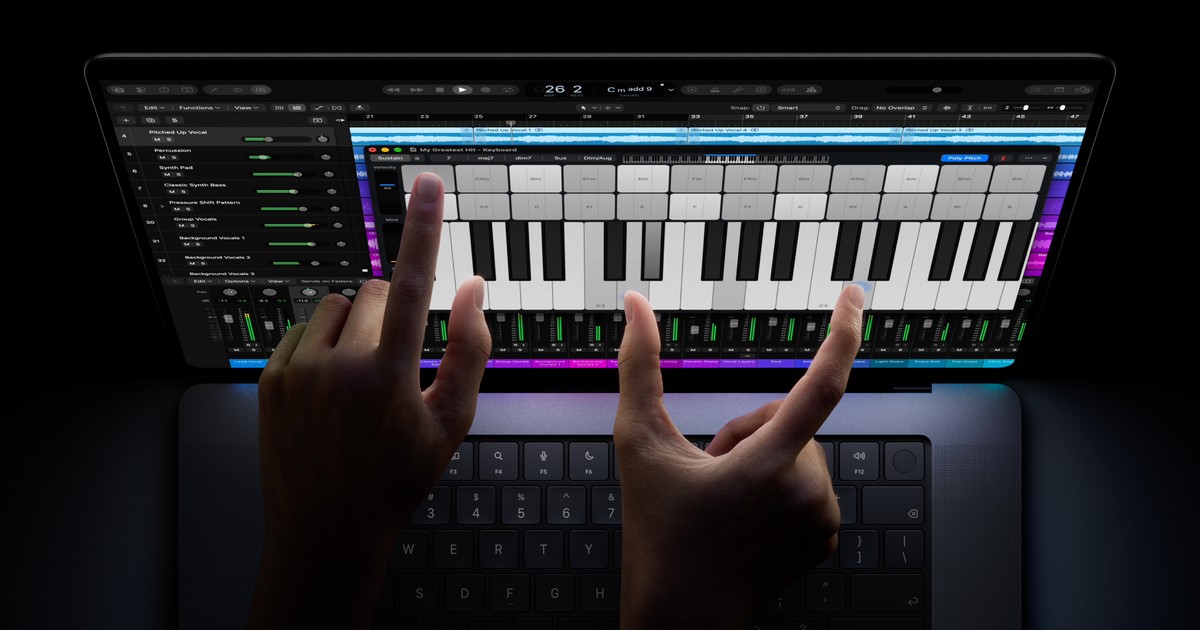
Apple built touch as a translation layer, not a new interface. A tap registers as a mouse click, a swipe scrolls, and a pinch zooms. macOS 27 adds small accommodations, such as window controls that expand when touched and menu items that spread out. There is no tablet mode, no floating keyboard, and no 360-degree hinge. The laptop still opens like a laptop and stands upright while you poke it.
That design keeps every existing Mac app usable on day one. It also limits what touch can do. The Verge found no onscreen keyboard when tapping a text field and no copy, paste, or select-all pop-up. Some game buttons did not respond to taps, and without hover there is no way to reveal certain controls. Pierce concluded, "The touchscreen is a mouse emulator and nothing more."
The gestures that exist are small conveniences. Six Colors reported that double-tapping selects text and tapping the traffic-light buttons zooms them out for easier targets. Gizmodo used a three-finger swipe to switch desktops and swiped up from the bottom of a mirrored iPhone window. It called touch "occasionally useful" and "not the end-all-be-all."
The Apple Pencil is not part of the story. Apple does not list stylus support, and Engadget said there is none. Gizmodo found that an Apple Pencil Pro registers taps because the screen is capacitive, but pressure sensitivity and haptics do not work. Anyone who wants to draw should still buy an iPad. The Mac's hinge is also stiffer to resist pushing, but it does not fold flat.
Usage frequency is the blunt test. Pierce estimated he used the touchscreen about half a dozen times a day, mostly to zoom photos, pause video, or show something to another person. He did not tap between spreadsheet cells or swipe through email. Snell reached the same conclusion after using it like an iPad with a keyboard: touch is handy, but the trackpad remains the primary tool.
Apple does give buyers an escape hatch. Six Colors noted that touch can be disabled in Accessibility settings, leaving a conventional Mac with a better screen. That option makes the feature easy to evaluate without committing to a new way of working.
What did reviewers measure for battery and performance?
Battery results varied with the test. Engadget's 14-inch M5 Pro lasted about 12.5 hours on a workflow of browser tabs, Slack, image editing, writing, and video calls. Its 16-inch model ran 10 hours and 15 minutes on a coding simulation. Gizmodo got roughly 8 hours from both sizes while writing and streaming video. The Verge finished a heavy workday with a third or more of the battery left.
Apple advertises up to 24 hours of battery life for the line, a figure Engadget attributed to light web browsing and 1080p streaming on the 16-inch model. No reviewer reproduced that number under mixed professional work. The spread from 8 to 12.5 hours is normal for laptop testing, but buyers should plan around the lower figure for heavy apps.
Capacity barely changed. Gizmodo reported a 72.6Wh battery in the 14-inch model, up from 72.4Wh, and the same 100Wh pack in the 16-inch. The efficiency gains come from the OLED panel and the chip, not a larger battery. That makes the weight reduction more impressive, since Apple removed half a pound without shrinking runtime.
Performance is familiar because the chips are not new. The PROLED models use the same M5 Pro and M5 Max silicon that Apple introduced earlier in 2026. Engadget's 14-inch M5 Pro with 48GB of memory scored 4,217 in Geekbench 6 single-core. That is strong, but it trails the cheaper M6 chip, which scored 4,458 single-core, 19,077 multi-core, and 64,115 in the GPU test in Engadget's review of the $1,999 model.
The M5 Pro and Max pull ahead on graphics and sustained work. Gizmodo measured the M5 Max close to 35% faster than a Microsoft Surface Laptop Ultra with an Nvidia N1X chip in Geekbench 7 multi-core, and just over 28% faster in Cinebench 2026. It also found the M5 Max about 30% ahead of the best RTX Spark result in 3DMark Steel Nomad. The M5 Pro trailed the M5 Max by 12% in Cinebench and rendered Gizmodo's Blender test scene in about one minute and six seconds.
Apple redesigned the cooling to handle the thinner body and to keep heat away from the OLED panel. The Verge noticed the fans turning on before the laptop felt warm, which it read as deliberate. Gizmodo found the fans loud at peak load but the palm rests cool. In a 30-minute Cyberpunk 2077 run at 1448p with ray tracing and MetalFX, it held 60 frames per second without the throttling it saw on the previous design.
Local AI work is a real use case for the 128GB configuration, though the evidence is early. Gizmodo ran a 92GB Qwen3.8 Flash Next model through Hermes Agent and found the M5 Max slightly quicker to first token than the Surface Laptop Ultra. It reported about 2 minutes 20 seconds to produce a Python script versus a little over four minutes on the Nvidia machine. That is one anecdote, not a benchmark.
Should you buy the PROLED model or the $1,999 M6?
The M6 MacBook Pro is the value argument in Apple's own lineup. For $1,999, it offers a 12-core CPU and 12-core GPU, a 120Hz mini-LED Liquid Retina display, 3.4 pounds of weight, three Thunderbolt 4 ports, and up to 32GB of memory. Engadget gave it 9 out of 10 and said it remains the most accessible MacBook Pro. Its single-core score beat the M5 Pro in the same publication's tests.
The PROLED model wins on screen, body, and graphics. It is 0.4 pounds lighter than the M6 in the 14-inch size, supports Thunderbolt 5, and offers up to 128GB of memory for local models. Whether those gains justify $900 depends on the work. A colorist grading HDR video will notice them. A student writing papers will not.
Reviewers split on the value call. Engadget said the 16-inch PROLED is the better value inside the new line because it costs only $400 more than the standard 16-inch. It called spending $900 extra on the 14-inch hard to justify unless you want the lightest MacBook Pro. The Verge said the roughly $400 like-for-like premium is worth it, touchscreen or not. Gizmodo called the price "obscene" but still named the machine the most premium laptop of the year.
The upgrade case is strongest for people coming from an M1-era Mac. The Verge said those laptops still work but are starting to show age, and the new design should last as long. Owners of M3, M4, or M5 machines have little reason to move. The chips are the same or only slightly faster, and the main gains are physical. Six Colors advised anyone unsure to wait, since the design will likely remain for several years.
Touch-first buyers should look elsewhere. The MacBook Pro has no tablet mode, no stylus pressure support, and no touch-optimized versions of most apps. A Windows convertible or an iPad with a keyboard case still serves that audience better. The PROLED model is for people who want a conventional laptop with the best available screen, not a device that transforms.
What happens next for the MacBook Pro?
The laptops reach customers on November 6, 2026. Retail demo units will let buyers judge the display and touch response in person, which matters more than a spec sheet. App support will arrive slowly because only the most expensive MacBook Pro has touch. Engadget reported that Adobe and BlackMagic plan to support it, and Six Colors saw a Logic plug-in using multiple fingers on separate controls. Those are early examples, not a broad ecosystem.
The chip roadmap is the biggest open question. Six Colors cited Bloomberg's Mark Gurman for the claim that Apple canceled the M6 Pro and M6 Max to move directly to an M7 generation next year. Gizmodo repeated reporting that future OLED MacBooks may use M7 Pro and M7 Max chips. Apple has not confirmed either claim. Buyers should treat the M7 timeline as reported but unproven, especially after a year with two MacBook Pro releases.
Apple's design direction looks clearer than its chip plans. The Verge expects every MacBook Pro to adopt this screen and body within a year or two, and Six Colors hopes touch spreads across the line. If that happens, the current model becomes the first of a generation rather than a one-off. It also means today's $2,899 entry price may look like the starting point for a broader price shift.
Several things are worth watching. Independent burn-in tests will show whether Apple's pixel compensation works over years. Longer battery benchmarks will clarify the gap between the 24-hour claim and real professional use. Developer adoption will determine whether multitouch becomes more than a mouse substitute. Memory prices will decide whether the $900 gap grows or shrinks.
For now, the reviews answer the immediate question. The MacBook Pro with PROLED XDR Display is a strong laptop whose headline feature is not the one in its name. The OLED screen and the lighter body are the upgrades that reviewers actually felt. Touch is a useful extra that most people will forget they have, and that is probably how Apple designed it.