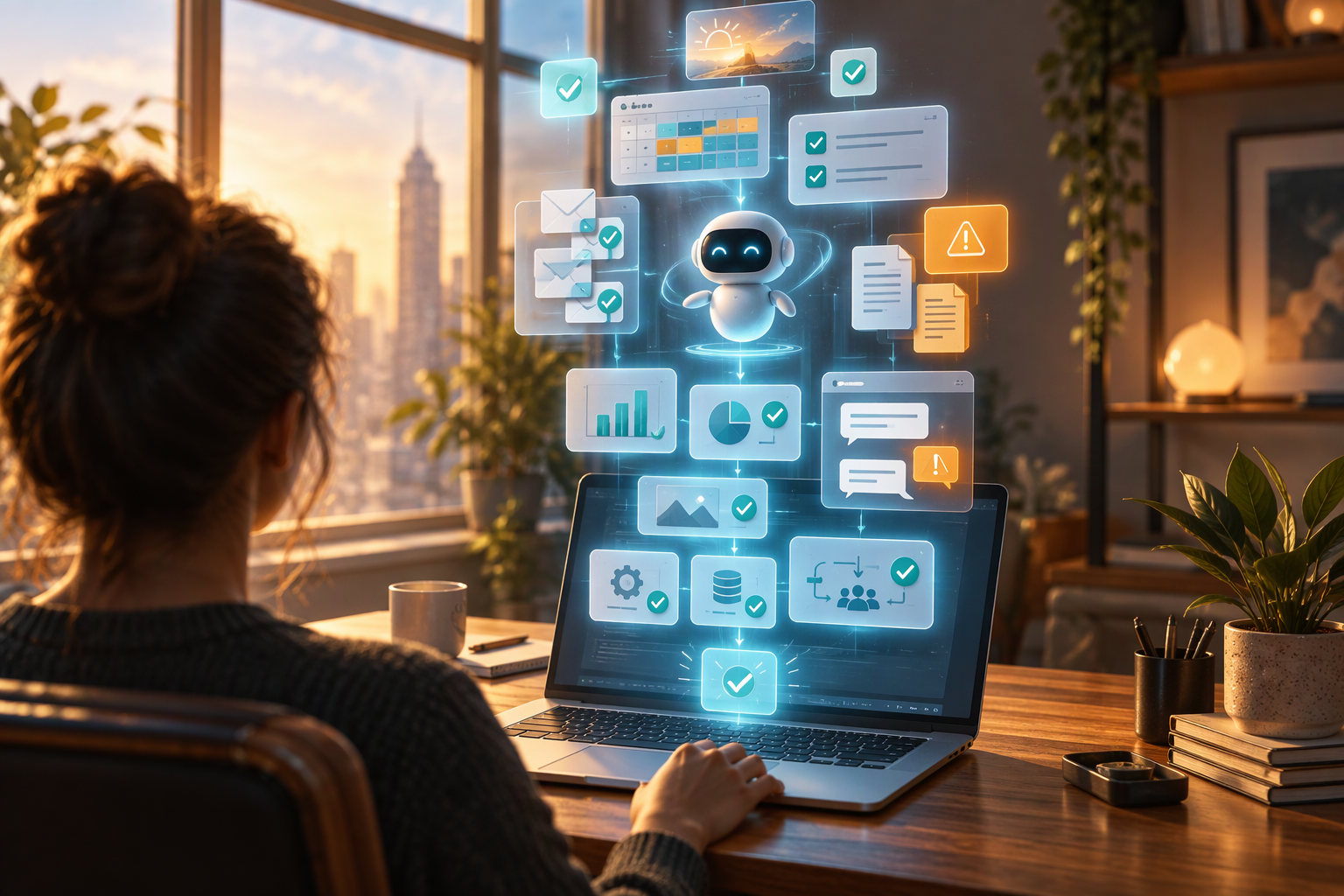
1. The Setup: Handing the Keys to an Autonomous "Autopilot"
For the past year, enterprise software vendors have relentlessly pitched the transition from passive chatbots to autonomous "autopilots" capable of reasoning across tools and executing multi-step tasks without constant human prompting. According to McKinsey's State of AI: Global Survey 2026 (McKinsey & Company, 2026), 40 percent of large organizations are now scaling AI agents across at least one business function, up sharply from 27 percent the previous year, while 80 percent of individual workers report that AI tools have improved their personal productivity.
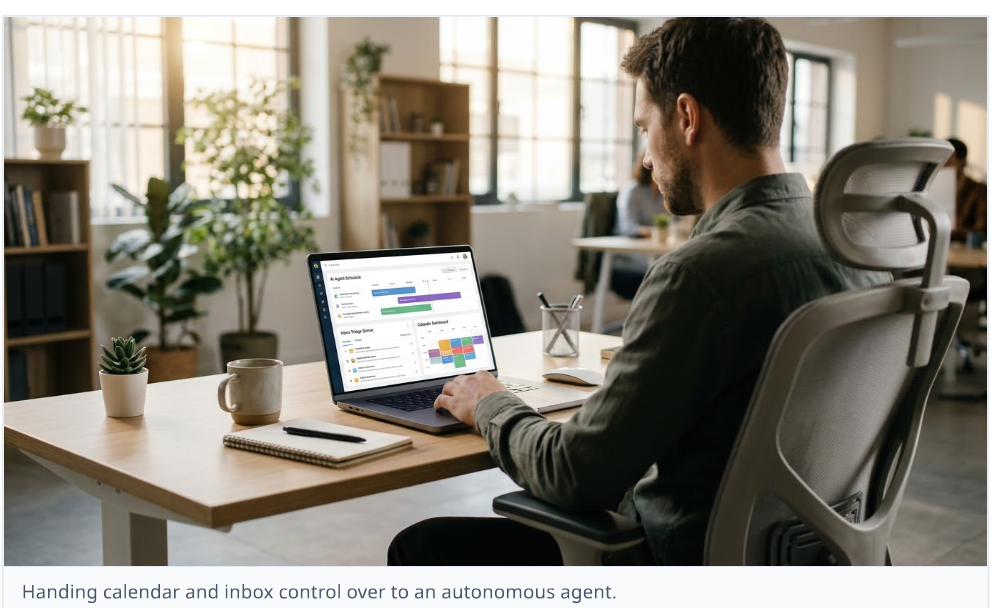
Yet reading survey benchmarks is very different from living inside an automated workflow. Most knowledge workers still treat AI like a glorified search bar—opening a chat window, pasting a paragraph, copying the output, and manually moving data between email, calendars, and project trackers. Recent analysis from the MIT Initiative on the Digital Economy (MIT IDE, 2026) highlights why macro-level productivity gains have lagged behind individual enthusiasm: by the end of 2025, only 11 percent of S&P 500 firms had deeply embedded AI into core operations, largely because organizations bolt chatbots onto legacy habits instead of redesigning how tasks hand off from start to finish.
To test what happens when you actually redesign a personal workflow around autonomy, I spent five consecutive workdays letting a multi-tool AI agent run my daily operations. I connected it to my email inbox, Google Calendar, Slack, and project management board, giving it explicit instructions to triage incoming messages, decline low-priority meetings, protect deep-work blocks, draft client replies, extract action items from call transcripts, and assemble my daily task queue every morning at 7:30 AM.
To keep the experiment honest—and prevent an accidental career-ending email—I established three operational guardrails inspired by enterprise governance frameworks:
- •Read-and-Draft Autonomy: The agent could read all incoming emails, Slack threads, and calendar invites freely, categorize them, and draft responses without asking permission.
- •Bounded Calendar Execution: It had full write access to move internal check-ins, decline conflicting invites without agendas, and block two-hour focus windows, but could not cancel external client calls.
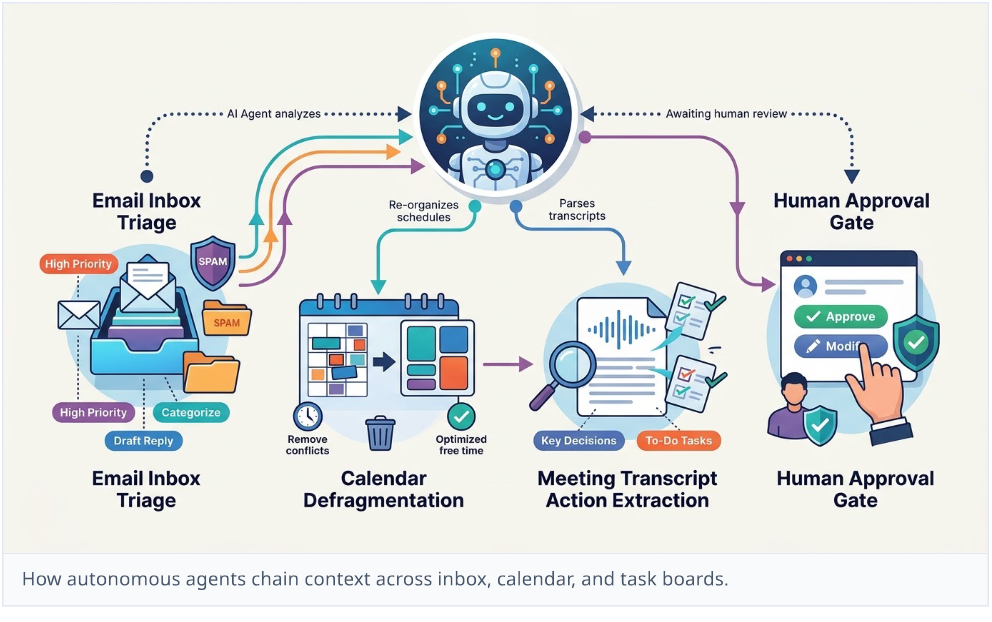
- •Human Approval Gate for External Sends: Any email or message leaving my organization sat in a staging queue requiring a single click from me before dispatch—mirroring the human-in-the-loop approval stages that enterprise platforms now treat as baseline governance.
Reference clips for the full-week automation setup
For a visual overview of how multi-step agentic workflows operate in 2026—and what happens when creators test similar full-week automation setups—explore the reference clips below:
- •I Let AI Agents Run My Life For 7 Days (How to Put Your Work on Auto-Pilot) — 0:00–0:10 covers the core experiment premise and initial automation setup.
- •What can i even do with AI agents? — 0:00–0:08 provides a rapid breakdown of autonomous task delegation across daily apps.
- •How to Use AI Agents to Automate Your Entire Workflow in 2026 — 0:15–0:25 illustrates how triggers, context memory, and tool connectors link together.
- •I Built an AI agent That Works For Me 24/7 — 0:10–0:20 demonstrates background execution logs and continuous task monitoring.
2. Days 1 and 2: The Quiet Magic of Inbox Triage and Meeting-to-Action
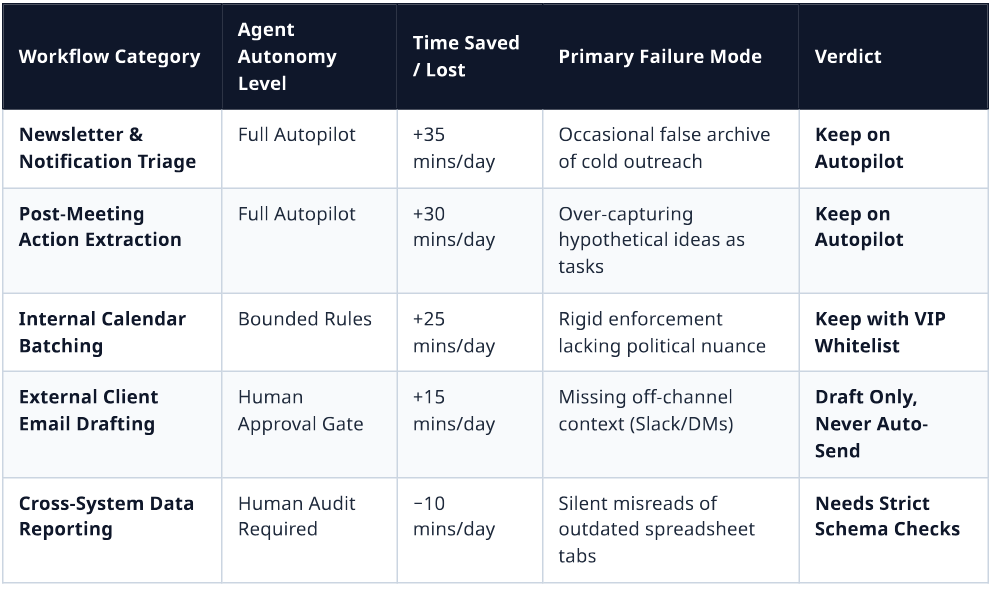
Monday morning felt eerily calm. Usually, my first forty-five minutes at my desk are consumed by triage: scanning forty overnight emails, archiving newsletters, answering routine scheduling questions, and figuring out what actually needs attention before my first call. By 8:00 AM on Day 1, the agent had already processed 47 incoming messages, archived 29 promotional or automated notifications, flagged 4 urgent client threads with two-sentence bullet summaries, and placed 14 pre-written draft replies in my staging folder.
This immediate relief aligns closely with where enterprise deployments are seeing the fastest return on investment in 2026 (Delos, 2026). Across industry benchmarks, high-volume, repeatable queues—specifically inbox triage, first-line customer replies, and post-meeting administration—consistently outperform open-ended creative or strategic tasks. When an agent operates inside well-defined boundaries on structured inputs, it eliminates the cognitive switching cost that fragments human focus.
By Tuesday afternoon, two specific workflows stood out as genuine breakthroughs:
1. Automated "Meeting-to-Action" Extraction: Normally, the gap between a video call ending and follow-up tasks entering a project tracker is where commitments quietly die. Connected to my call transcription feed, the agent parsed every thirty-minute sync, stripped out small talk, identified explicit decisions, assigned owners, and populated my task board with due dates before I had even closed my browser tab. Across six meetings on Monday and Tuesday, it captured 19 action items with 100 percent accuracy on task ownership.
2. Ruthless Calendar Defragmentation: Knowledge workers lose hours every week to "Swiss cheese" schedules—scattered thirty-minute gaps between meetings that are too short for deep analytical work. Instructed to batch internal syncs into afternoons and enforce a strict "no agenda, no meeting" policy, the agent politely replied to three vague internal calendar invites asking for a bulleted objective before accepting, and consolidated two fragmented afternoon calls so I had an uninterrupted three-hour block from 9:00 AM to noon on Tuesday.
At the end of Day 2, I had reclaimed roughly two hours and fifteen minutes of administrative overhead. I was ready to declare the future of work officially solved. Then Wednesday happened.
3. Days 3 and 4: Silent Failures, Social Friction, and the "Verification Tax"
The cracks in autonomous delegation rarely look like dramatic system crashes. As systems engineers studying agentic reliability in 2026 point out (Trantor, 2026), traditional software fails loudly—an API throws a 500 error, logs an exception, and stops. Autonomous agents fail silently: they complete a multi-step sequence, return a confident, grammatically polished confirmation, and execute the wrong real-world decision.
Even worse is the compounding math of multi-step workflows. Research on agent failure modes highlights a sobering statistical reality: if an AI agent achieves 95 percent accuracy on each individual step, chaining ten sequential steps together drops the overall workflow success rate to roughly 60 percent. On Wednesday and Thursday, I experienced that compounding probability firsthand through three distinct failures:
- •The Context-Blind Calendar Decline: A senior partner sent a last-minute calendar invite titled "Quick sync" with an empty description field. Following my strict "no agenda, no meeting" rule to the letter, my agent automatically declined the invite and sent a polite note requesting a structured agenda prior to booking. Technically, the agent followed its prompt. Socially, it stiff-armed an executive who wanted to discuss a sensitive organizational change that he intentionally avoided putting in writing. Repairing that awkwardness took a ten-minute phone call and a sheepish explanation.
- •The Hallucinated Deadline Commitment: On Thursday morning, a client emailed asking if we could deliver a revised data audit by Friday afternoon. Looking at my calendar, the agent saw four open hours on Thursday afternoon and drafted a confident reply confirming Friday delivery. What the agent could not see was that the data audit depended on an external vendor export that had been delayed in a Slack direct message the previous evening. Had I not caught the draft in my approval queue, I would have committed to an impossible deadline.
- •The "Verification Tax" on Complex Synthesis: For my Thursday afternoon weekly status report, I asked the agent to pull metrics from three spreadsheets, summarize project risks, and draft the narrative recap. It produced a clean, executive-ready document in forty seconds. However, when I audited the numbers against the raw sheets, two figures had been pulled from an outdated tab. Checking every single number, cross-referencing dates, and verifying tone across forty drafted emails began consuming nearly as much mental energy as writing them myself—a phenomenon MIT researchers warn about when human oversight loosens or becomes purely reactive (MIT IDE, 2026).
Key Lesson from Day 4
Key Lesson from Day 4: When you automate execution without automating context, you don't eliminate work—you transform yourself from a creator into a full-time compliance auditor for a hyper-confident intern.
4. Day 5 and the Research Reality: How to Actually Work With Agents in 2026
By Friday morning, I stripped away half of the agent's autonomous write permissions and reconfigured my setup based on what actually worked over the first four days. Instead of asking the agent to run my workday end-to-end, I demoted it from "chief of staff" to "overnight operations analyst."
On Day 5, the agent did zero unapproved calendar declines and zero external commitments. Instead, at 7:00 AM, it compiled a single structured morning briefing: categorized unread emails with links to source threads, flagged scheduling conflicts with proposed options for me to click, extracted action items from Thursday's transcripts, and highlighted missing data inputs I needed to chase before noon. Friday was easily my most productive day of the week—saving roughly ninety minutes of administrative drag without a single social misfire or verification headache.
My week-long experiment mirrors the broader empirical consensus emerging across workplace research in 2026:
1. Redesign the Handoff, Don't Just Anthropomorphize the Tool: Research from the MIT Initiative on the Digital Economy (MIT IDE, 2026) found that naming AI agents and treating them like autonomous employees on an org chart actually reduces effective human oversight rather than improving it. High-performing teams treat agents as deterministic pipelines with explicit human checkpoints—having the user review the agent's underlying rationale rather than blindly trusting a polished final output. Similarly, McKinsey's 2026 research (McKinsey & Company, 2026) reveals that nearly three-quarters of AI high performers fundamentally redesigned specific workflows around human-agent handoffs, compared to only one-quarter of organizations that simply handed staff general-purpose assistants.
2. Protect the "Developmental Ladder" of Expertise: In a June 2026 working paper from the Harvard Kennedy School (Rashidi, 2026), senior fellow Sol Rashidi warns that while previous technological waves automated routine tasks while preserving the experiential pathways through which workers built judgment, over-delegating entry-level synthesis and coordination to agents risks eroding human situational awareness. When an agent summarizes every email and every meeting for you, you lose the peripheral context—the subtle hesitation in a client's phrasing or the recurring friction between two teams—that informs sound leadership decisions.
3. Apply Least-Privilege Autonomy: Both RAND Corporation's analysis of enterprise AI initiatives and 2026 resilience engineering benchmarks (Trantor, 2026) emphasize that 80 to 88 percent of ambitious agent projects fail or stall before production because teams grant broad autonomy before establishing observability, rollback paths, and least-privilege access. An agent should have unrestricted read access to gather context across silos, narrow write access to structured trackers, and zero unilateral authority over high-stakes external communication.
Letting an AI agent run my workday for a week proved that autonomous software is already good enough to eliminate the most tedious 30 percent of knowledge work. It can clean an inbox, protect focus blocks, and turn messy conversations into structured task lists faster than any human assistant. But the experiment also exposed a hard boundary: an agent optimizes for the rules you write, while real work happens in the unwritten context between people. Hand over the repetitive queues, keep a tight grip on the judgment calls, and never let an algorithm decline a meeting with your boss.
Watch: the experiment in two clips
Two short motion clips accompany this report: the agent workspace taking over calendar sync, email triage and live meeting notes, and the human approval step where a drafted client reply waits for a single click.
Sources & Research Cited
The research cited across this field report:
- •MIT Initiative on the Digital Economy (November 2026): AI Adoption in 2026: What MIT Research Tells Us About the State of Enterprise AI — Analysis of S&P 500 SEC filings, the AI productivity J-curve, and Emma Wiles's research on human oversight and agent anthropomorphism.
- •McKinsey & Company (August 2026): The State of AI: Global Survey 2026 — Global survey data on enterprise agent scaling (40% in large enterprises), individual productivity gains (80%), and workflow redesign among high performers.
- •Harvard Kennedy School / M-RCBG (June 2026): Future of Work in the Age of Automation, Augmentation, and Agentic AI (Working Paper No. 276 by Sol Rashidi) — Research on workforce adaptation, experiential learning pathways, and human-agent collaboration.
- •Trantor / RAND & Gartner Benchmarks (May 2026): AI Agent Failure Modes — What Goes Wrong and How to Design for Resilience — Analysis of multi-step compounding error rates, silent failures, and least-privilege agent architecture.
- •Delos (October 2026): From Inbox to Done: 7 Workflows Enterprises Automated With AI Agents in 2026 — Field benchmarks on inbox triage, meeting-to-action extraction, and report assembly.